
In this update, we have focused on introducing new tools, improving platform performance, and ensuring compliance with Google's latest standards. We have also resolved several bugs in the Editor to ensure a smoother workflow.
New
-
Cable connection and removal tools
Two new tools have been added for Line & Grid to make editing and creating cable connections easier..gif?width=670&height=333&name=Cable%20connection%20and%20removal%20tools%20(1).gif)
-
Weather correction in Viewpoints
Each viewpoint now has an option to brighten or darken the 3D models while inside that specific viewpoint, allowing for better visual integration..gif?width=670&height=333&name=Weather%20correction%20in%20Viewpoints%20(1).gif)
-
FPS meter in performance settings
An FPS meter has been added for performance tracking. This can easily be toggled on and off in the editor settings.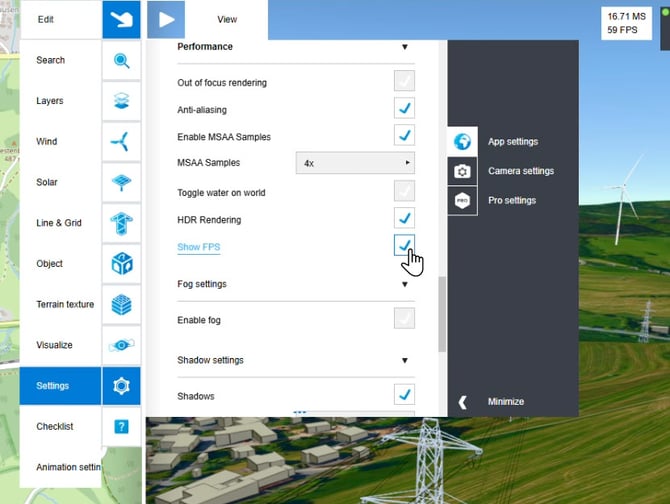
-
Present language settings
When creating a Present link, you now have the option to choose a language that translates the user interface (note: this does not translate your custom content)..gif?width=670&height=550&name=Present%20language%20settings%20(1).gif)
-
Undo controller functionality
It is once again possible to undo the positions of all models correctly. This works per action: if you drag one item, your undo action reverts that one item. If you drag five items at once, your undo action will revert all five simultaneously.
Optimized
-
Massive performance boost via Model Instance Collection
Model instance collection has been applied to Object and Line & Grid. This provides a massive performance improvement, though with a minor usability trade-off: when moving a pylon live, the marker moves with your cursor, but the 3D model itself will only update its position once you release it. -
Apple CMD key support
Editor controls that previously required the user to press the CTRL key now also work seamlessly with the CMD (⌘) key on Apple devices. -
Google Maps base layer & instant transitions
When entering a street view, the base layer of the 2D map is now replaced with a Google Map, as this is required by Google. To further comply with Google's rules, we no longer use an animated transition from the 3D world into the panorama; this transition is now instant. -
Arrow keybinds in panoramas
While inside a viewpoint with a panorama, you can now use the arrow keys on your keyboard to look around. -
Sort viewpoints and scenarios for Present
During the creation of a Present, you can now change the order of the viewpoint and scenario lists to customize exactly how they are displayed to your audience. -
Revoke project access
It is now possible to remove project members and observers from projects. -
More details on project roles
The dashboard now displays more details regarding project members and observers, including exactly which projects they are a part of. -
Optimized rendering inside panoramas
The optimized rendering of smaller and complex models (such as cables, pylons, and fences) was previously being blocked by the crosshair during masking. A fix has been found and implemented, meaning these such elements can now be rendered at a higher quality inside panoramas.
Bug Fixes
-
Fixed: Layer order in panorama state
Due to Google compliance rules, customer data was sometimes falling behind the mandatory Google Map layer. This has been resolved, and your data now correctly appears on top again.
-
Fixed: GPS data from custom panoramas
Previously, if no altitude was found in the data of a custom panorama, the execution would fail entirely. These checks have now been separated: the system will first successfully check for latitude and longitude, and only look for altitude afterward.